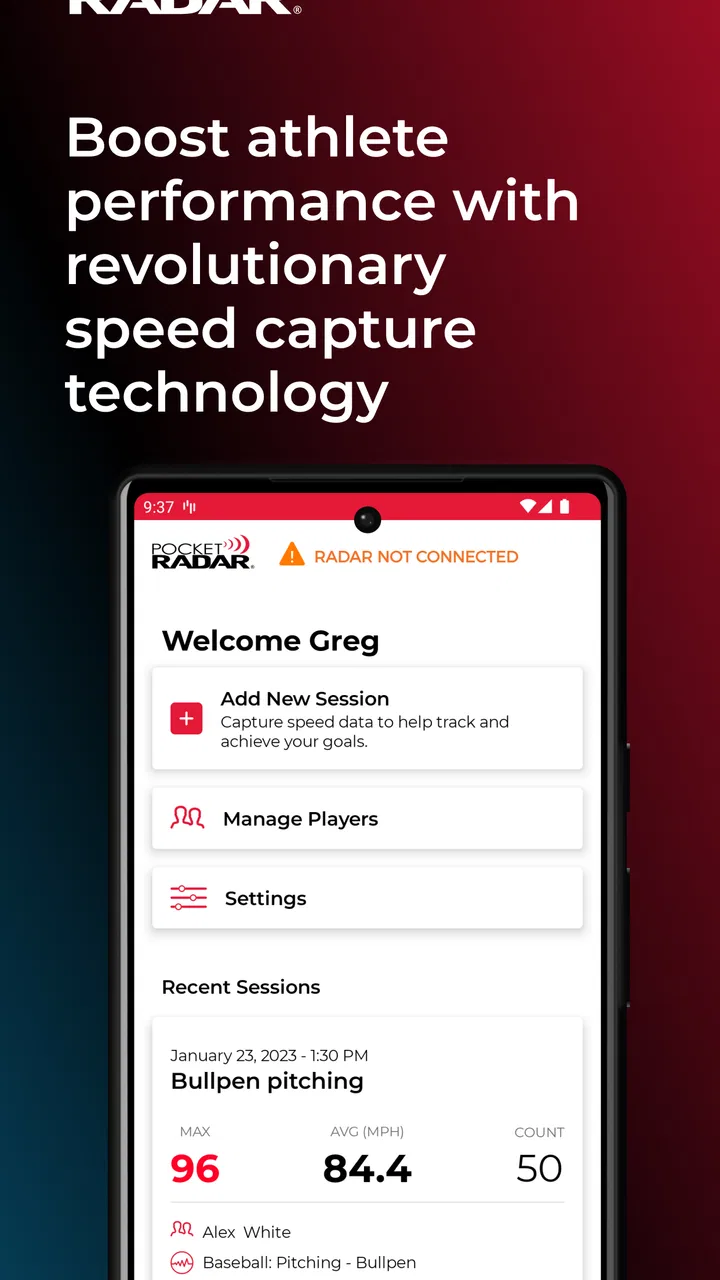
Pocket Radar® Sports
- 3.2
- Rating
- 100.00K
- Installs
- Free
- Price

 Analysis by App-foxy
I approached Pocket Radar® Sports as a practical training companion rather than a general sports app, and that distinction matters. Its purpose is to combine speed readings with video practice, but the experience depends on having a compatible Smart Coach Radar Device. Without that hardware, the app is not a complete standalone tool. With it, however, it can turn ordinary practice footage into something more useful: a record of what happened, how fast it happened, and which moments are worth reviewing later.
That makes this free sports app from Pocket Radar, Inc. interesting for players, parents, coaches, and small training groups who want more structure than a phone camera alone can provide. I would not recommend installing it casually and expecting the app itself to measure everything. I would recommend it to someone who already owns, or is seriously considering, the required radar device and wants a connected way to organize speed-focused practice.
What the connected training experience does well
The clearest strength is the relationship between measurement and video. A speed number by itself can be useful, but it is easy to forget what the athlete did immediately before it. Video by itself shows movement, yet it does not always tell you whether a change in technique affected the result. Bringing those two kinds of information together gives a coach or athlete a better basis for discussion than either one alone.
You May Also Like

 Blood Strike: 2.5 Anniversary
Blood Strike’s Loadouts Turn Every Drop Into a Tactical Gamble
A close look at Blood Strike’s custom loadouts: how fast access to signature weapons reshapes its battle royale rhythm, rewards preparation, and narrows the gap between fights.

 Pandora - Music & Podcasts
Pandora’s Music Is Easy to Start, but Harder to Recover
Pandora’s strength is its low-effort path from a seed to a station. Its weak spot is how much confidence it asks you to place in connection, setup, and quiet recovery.

 8 Ball Pool
 Is Built on Rivalries, Rematches, and Routine
A close look at the rivalries, rematches, shared routines, and unanswered safety questions that turn a quick pool match into a persistent mobile community.

 Samsung Music
’s Quiet Strength Is Playing What You Already Own
Its reach comes less from spectacle than from dependable access to a personal library. That simplicity is both the app’s strongest retention engine and its ceiling.

 AccuWeather: Weather Radar
AccuWeather Review: A Quick, Clear Forecast for Everyday Decisions
For everyday plans, the best forecast is the one you can understand quickly. AccuWeather makes rain timing, radar, and local conditions easy to act on, with a few trade-offs.

 Hill Climb Racing
Why Hill Climb Racing Still Turns Crashes Into One More Run
A tiny car, a bumpy hill and one more upgrade: Hill Climb Racing keeps resurfacing because its simple chaos makes every near-miss feel personal.
More From Our News Desk



In a realistic session, I would set up the radar device, position the phone where the action is visible, and use the app as a running record while the athlete repeats a drill. Afterward, the useful work begins: reviewing a particular attempt, comparing the feel of a motion with its recorded speed, and identifying whether a technical adjustment appears to help. The value is not just in chasing the highest number. It is in connecting a result to a repeatable movement.
That workflow is especially helpful when practice becomes too fast for memory. A player may believe a throw felt cleaner, or a parent may remember only the best attempt, while a coach notices a different pattern. Recorded sessions make those conversations less dependent on impressions. I like that the app is aimed at this practical gap between “we trained today” and “we know what changed today.”
The video side also gives the app a useful role outside the training moment. A short clip can help an athlete review posture, timing, release, or follow-through later, when there is no pressure to perform another repetition immediately. It can also help a coach explain a correction visually instead of repeating the same verbal instruction. That is a more meaningful use of a phone than simply filming an entire session and never watching it again.
Another strength is that the system encourages a more disciplined practice habit. When speed and footage are captured together, it becomes easier to create a simple routine: establish a baseline, make one adjustment, repeat the drill, and review the outcome. I would avoid changing several things at once, because the app cannot make a messy experiment meaningful. Its best results come when the user treats each session as a small test rather than a hunt for an impressive reading.
The app is also more focused than many broad sports-training platforms. It is not trying to become a social network, a general workout planner, or a giant library of unrelated exercises. That narrow purpose can be a benefit. If your main question is how a movement looks alongside its speed result, the interface and hardware pairing are pointed in the right direction instead of being buried under unrelated content.
Its popularity suggests that the idea has found an audience: the app has passed 100 thousand installs, while its average rating sits at 3.2. I read that combination as a sign of a useful but specialized product. Many people are willing to try a connected radar-and-video system, yet the middling rating also warns that the experience may depend heavily on setup, expectations, and the quality of the paired device.
A workflow that makes the readings more useful
My strongest practical advice is to decide what you are trying to learn before opening the app. If the goal is to improve throwing speed, for example, choose a small number of repeatable attempts and keep the camera position consistent. If the camera moves between repetitions, the visual comparison becomes weaker. If the athlete changes effort, technique, and drill at the same time, the speed figures become difficult to interpret.
A second useful habit is to review representative attempts, not only the fastest one. The biggest number may reflect a particularly aggressive effort that the athlete cannot repeat safely or consistently. A slightly lower result paired with cleaner mechanics may be more valuable for long-term training. The app can support that judgment, but it cannot make it for you. The user still needs to distinguish a sustainable improvement from a one-off peak.
I would also use the video as a coaching record rather than a scoreboard. A session can be successful even when the top speed does not rise. Perhaps the athlete maintained better balance, repeated the motion more consistently, or learned which cue causes a problem. Those details are exactly why the video component matters. Treating every practice as a competition against the previous number would reduce the app to a narrow speed display.
For parents, the system can make home practice more constructive. Imagine a young player working in a driveway or backyard while a parent records a short series. Instead of offering vague encouragement or criticism, both can look at the motion and the associated result afterward. The parent does not need to act like a professional coach; the footage simply creates a clearer starting point for deciding what to ask the coach at the next session.
For a coach with several athletes, the trade-off is different. The app may be helpful when the coach wants a compact record of individual attempts, but the value depends on how carefully the phone and radar are managed between players. A rushed changeover can lead to confusing clips or inconsistent conditions. I would build a simple routine around labeling or reviewing sessions immediately, rather than assuming everything will be obvious later.
Where the experience can become frustrating
The biggest limitation is also the most important fact about the product: the app requires a Smart Coach Radar Device. This is not a minor accessory that can be ignored. Anyone expecting a free phone-only speedometer will be disappointed. The app’s usefulness is tied to a separate piece of equipment, so the real cost and commitment are broader than the app’s free download suggests.
That requirement changes how I compare it with usual alternatives. A basic camera app is easier to start with and costs no extra hardware, but it cannot provide the same connected speed-training purpose. A standalone radar device may be simpler when all you want is a quick reading, while a manual notebook may be enough for athletes who already know how to record results. Pocket Radar’s approach sits between those options: more informative than video alone, but more involved than checking a number and moving on.
There is also a learning curve in getting reliable value from any radar-and-video setup. The athlete, the camera, and the device need to work together in a consistent practice environment. I would not judge the app after one rushed attempt. First-time users should expect to spend time understanding the setup and deciding where the phone belongs. That preparation is not a flaw unique to this app, but it is part of the ownership experience and should be included in the decision.
The average rating is a useful reminder to keep expectations realistic. A connected training tool can be excellent in the hands of a patient coach and awkward for someone who wants instant, effortless results. Ratings in this range often reflect that divide: the concept is appealing, but the experience is not equally convenient for every user. I would choose it for a deliberate practice routine, not for spontaneous measurement at every opportunity.
Another limitation is interpretive rather than technical. Speed readings can tempt athletes into overtraining or focusing too heavily on a single metric. A higher number does not automatically mean better form, better control, or better game performance. The app gives training evidence, not a complete assessment of athletic development. It should sit alongside coaching judgment, recovery, and sport-specific goals instead of replacing them.
In-app purchases range from one dollar to forty-nine dollars and ninety-nine cents per item, so users should pay attention to what they choose inside the app. The free entry point is appealing, but the broader experience may involve optional spending. I would only purchase something after deciding that the connected workflow is already useful in my routine. Buying extras before testing the basic process could make an already specialized product feel more expensive than expected.
Who will get the most from it
I see the best fit in committed youth and amateur athletes, families who actively support regular practice, private coaches, and teams that want a visual record of speed-related drills. These users are more likely to repeat the same exercises, review footage, and act on what they see. They also have a reason to keep the radar device available instead of using it once and leaving it in a drawer.
It can be particularly valuable when the athlete struggles to understand why a result changes from attempt to attempt. The video may reveal a rushed approach, a different release point, or a loss of balance that is hard to feel in the moment. Even when the app does not solve the issue directly, it can turn a vague problem into a more specific coaching conversation. That is a meaningful advantage over simply writing down the fastest reading.
I would be more cautious recommending it to a casual user who only wants an occasional speed check. For that person, the required Smart Coach Radar Device and the extra setup may outweigh the benefit of combining video with measurements. A simpler standalone solution could be the better choice if the goal is only to see a number quickly. Likewise, someone who has no interest in reviewing footage is unlikely to use the app’s most distinctive strength.
It is also not the right choice for someone looking for a complete training plan or a broad fitness companion. Its identity is rooted in speed and video practice, not in replacing a coach, building a full schedule, or covering every part of athletic preparation. I appreciate that focus, but buyers should choose it for the problem it actually addresses rather than expecting a universal sports platform.
The age rating is Everyone, which makes the app approachable for family use, but younger athletes still need sensible adult supervision around training intensity and equipment placement. The rating describes accessibility, not coaching quality. A parent or coach should decide whether the drill is appropriate and whether the athlete is interpreting the results in a healthy way.
Compatibility and day-to-day expectations
The app requires an operating system version 10 or newer, and the current version is 2.4.2. Before planning a team workflow, I would check the phones that will actually be used at practice rather than assuming every older device is suitable. This is a small step, but it prevents the frustrating situation of arriving with the radar ready and discovering that the intended phone cannot run the app properly.
I would also treat the phone as part of the measurement routine, not as an afterthought. Battery, storage, camera position, and a stable place to record all affect how practical a session feels. These are ordinary phone concerns, but they matter more when the purpose is to preserve useful clips and compare attempts. A few minutes of preparation can make the difference between a clean training record and a collection of footage nobody wants to sort through.
The developer, Pocket Radar, Inc., has built the app around a specific piece of training hardware rather than a purely software-based promise. That gives the product a clearer purpose, but it also means the app should be judged as one part of a system. If the device is already part of your training kit, the app becomes easier to justify. If you are starting from zero, compare the complete setup with simpler alternatives before committing.
One question many users will have is whether the app is useful without the radar device. My answer is no: the central experience depends on that Smart Coach Radar Device. The phone can provide video, but the app’s distinctive training value comes from combining that footage with the required radar hardware. That is the first thing I would clarify before downloading or spending money.
Another likely question is whether the app is suitable for serious coaching. I think it can be, especially for focused drills and athlete feedback, but I would not treat it as a replacement for professional observation. It is strongest as evidence that supports coaching decisions. The coach still needs to evaluate movement quality, fatigue, safety, and whether a speed change transfers to actual performance.
Users may also wonder whether a higher speed always means progress. In my view, it does not. The most useful comparison is between similar attempts made under similar conditions, with attention to repeatability and technique. A single peak can be motivating, but a pattern of solid attempts paired with better movement is more convincing. That is why I would review several clips and avoid building a training plan around one exciting result.
My final recommendation
Pocket Radar® Sports is worth considering when you want a connected speed-and-video practice system, not when you want a free phone-only measurement tool. Its best contribution is the bridge between what an athlete feels, what the camera shows, and what the radar records. That bridge can make practice more thoughtful and coaching conversations more concrete.
I like the app’s focused purpose and the way it encourages users to review attempts instead of relying on memory. I also appreciate that it can support small, repeatable experiments: change one part of a motion, record the result, and look for a pattern. Those are practical benefits that a generic camera app does not provide on its own.
Still, the hardware requirement is a real barrier, and the setup demands more care than a casual user may expect. The free price should not be the only factor in the decision, especially with optional in-app purchases and a system built around a separate radar device. If you already have the compatible equipment and will use the video review seriously, this is a sensible addition to a structured sports routine. If you only want an occasional speed reading, I would choose a simpler alternative.
Overall, I would recommend it to athletes and coaches who value context more than isolated numbers. Used thoughtfully, it turns practice into something easier to observe, discuss, and improve. Used casually, it risks becoming another app attached to equipment that rarely leaves the bag.
FAQs for Pocket Radar® Sports
01What is Pocket Radar® Sports used for?
Pocket Radar® Sports is designed to measure the speed of moving objects, particularly sports equipment such as baseballs, softballs, soccer balls, and other projectiles. During testing, it was most useful for coaches, players, parents, and fans who want quick speed readings during practice. It can help track progress, compare attempts, and add measurable feedback to training sessions, although results depend on positioning and the radar device being used.
02Does the Pocket Radar® Sports app work by itself, or do I need extra hardware?
The app is generally intended to work with compatible Pocket Radar hardware rather than replacing the radar unit entirely. Before downloading, check the current compatibility information for your Android or iOS device and the specific Pocket Radar model you own. Features may differ depending on the hardware, connection method, operating system, and product version, so installing the app alone may not provide full speed-measurement functionality.
03How accurate are the speed readings in Pocket Radar® Sports?
Pocket Radar® Sports can provide useful readings for training and recreational analysis, but accuracy depends on several practical factors. The radar must be aimed correctly, the subject should move predictably toward or away from the device, and the surroundings should not create interference. We recommend following the setup instructions carefully and treating readings as coaching information rather than official competition measurements unless the equipment is specifically approved for that purpose.
04Can I record, save, or share speed results with Pocket Radar® Sports?
The app is built to make speed tracking more convenient, and supported features may include viewing readings, organizing results, and sharing training information. However, the exact tools available can vary according to the connected Pocket Radar product and app version. After installation, review the permissions and account requirements, then test a short session before relying on the app for long-term player records or team-wide performance tracking.
05Is Pocket Radar® Sports suitable for beginners and young athletes?
Yes, the app can be useful for beginners, parents, and young athletes because it turns practice into something easier to measure and understand. Its value is greatest when readings are used alongside proper coaching rather than as the only indicator of performance. Adults should supervise younger users, explain safe throwing and kicking distances, and avoid encouraging athletes to sacrifice technique or safety simply to achieve a higher speed.
Pros
- Accurate speed readings for baseball
- softball
- and other sports
- Simple interface makes recording pitches quick and convenient
- Useful for player training
- coaching
- and performance tracking
- Works with compatible Pocket Radar hardware for expanded features
- Portable design lets you measure speed at practices or games
Cons
- Many advanced features require separate Pocket Radar hardware
- Accuracy can vary with positioning
- distance
- and surrounding conditions
- Some users may find the equipment expensive for casual practice
- Limited usefulness if your sport or activity is not speed-focused
- Phone compatibility and required permissions may vary by device

Pocket Radar® Sports
Gallery